Get the latest updates of your data recovery case: Data Recovery online application form
Home Prices Shipping Payment Help About Us Contact Us
Call us
How to remove a Hard Drive


Instant Data Recovery Price Calculator

Data Recovery Cost

We will salvage your data thoroughly at a very affordable price.

Our customers talk...

From Lisa C.
Mesa, Arizona USA

Fujitsu MHT2060AT laptop disk

Motor broke... Recovery attempts: Hooked drive up to another computer to try to get it to spin, but no luck.


After recovery:

Dear Data-R-Us.com team,
Thank you so much for recovering my data! :) Thanks again and please think about sending some of your business cards to me when my drive is eventually shipped. I'd be more than happy to give them to the Apple Store to hand out to customers when their drives break/fail. The companies they recommended to me all quoted me $2000 to retrieve my data, so your company would be very much utilized I think if more people knew about you. :)
Lisa C.


From Off The Front Marketing
Tracy S.
Bend, OR USA

Seagate ST3120022A external disk

Unable to access the drive. Was connected to a test machine by local IT professional and wasn't able to see in BIOS.


After recovery:

Thanks for what looks to be a great job so far. Thanks again, what speedy job you've done. ...I'll definitely write a recommendation for you guys and let other know about your services.


From Dane R.
Corvallis, OR USA

IBM IC25N040ATCS04 laptop disk

Failed in BIOS or CMOS. Drive spins up on power on but fails to be recognized by bios. No head slamming noises. Failed one morning when house was cool. That afternoon, tried again and booted fine. Wrote off some data to CD but had a system hang when connecting to a large backup drive. Had to power down and it has never booted since. I was mfg engineer for HP laptops and have recovered many drives myself. Even opening them sometimes. I uncovered the hidden screw, thinking I might open this one, but decided against it - It has NOT been opened. I suspect a firmware chip on the board has failed.


After recovery:

Thank You very much for what appears to be a near perfect recovery.


More testimonials...


Do not forget to remove the bracket and a connector bar from the hard drive, if they used on your model.

Keep them for the new drive installation.


HDD removal manual

How to Remove the Hard Drive from Gateway M275 Convertible Tablet Notebook


Hard drive removal on the Gateway M275 Convertible Tablet Notebook

1. Shut down the convertible tablet notebook, and then disconnect the power adapter.

2. Turn the convertible tablet notebook over, and then remove the battery:

  • Slide the battery lock [1] to the unlocked position.
  • Slide the battery release latch [2].
  • Lift the battery out of the bay [3].

Remove the battery

3. Remove the hard drive from slot:

  • Remove the two hard drive bay screws [1]
  • Slide the hard drive kit away from the computer: Pictures [2] and [3]
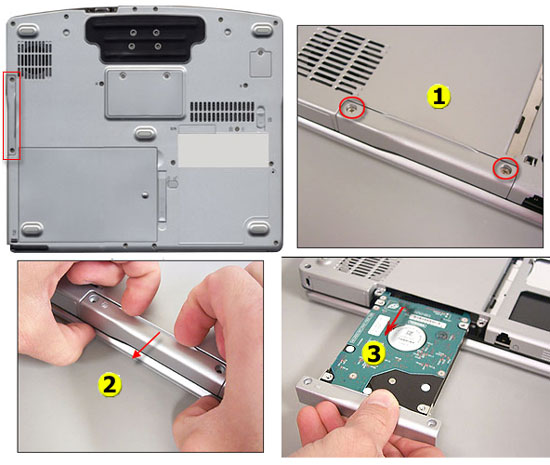


How to extract the HDD from laptop

  • Remove the two screws [4] that secure the hard drive to the hard drive kit bracket
  • Remove the bracket from the failed hard drive [5]Remove the bracket

Note: Keep the bracket kit for the new hard drive installation.


After you are done with the hard drive removal you may proceed to placing the data recovery order.


Copyright 2012 Data-R-US.com Data Recovery Services. All Rights Reserved.