How to Remove the Hard Drive from Dell Desktop computer
The article contains a pictorial demonstration of the hard drive removal instructions for Dell desktop computers. Note that same model number may refer to different chassis types and form factors.
Most of operating Dell desktop computers come from the OptiPlex production line but have few different chassis. The OptiPlex models come in several sizes and chassis styles that have been changed and evolved with newer technology. Dell chassis are primarily a tool-less, but certain procedures (such as removing drive’s bracket rails) require the use of one or more of the following tools: Set of screwdrivers that includes a small flat-blade screwdriver and small Phillips screwdriver. Plastic Scribe to pry the snap-fit flexible parts can be helpful too.
OptiPlex AIO (Dell All-in-one)
All-in-one models: 3010/3011/9010(2012/2013), 3011(2013), 3030/9030 (2014)

To remove the hard drive you will need to remove a stand from the monitor part. To do so, use a plastic scribe to release the stand cover from the back of the stand, and then remove the stand cover from the chassis. Next step: Removing the four screws from the back of the stand and lift the stand up and away from the chassis. To remove the rear cover - use a plastic scribe to unlock the tab on the top left corner (at the optical drive) of the chassis. Work your way around to loosen the rest of the tabs and remove from the chassis. Hard Drive located right in the center for 9020 AIO model, other models have the drive in the corner (red arrow) as on the picture from Dell manual for 3030:
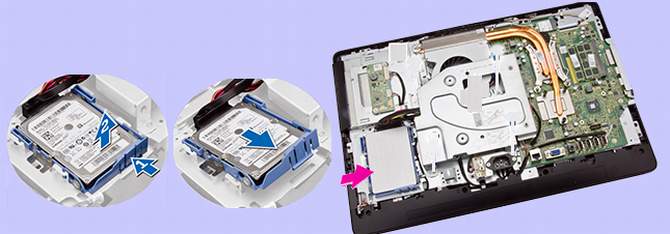
Push the hard-drive bracket to release it from its lock(#1) and lift the hard drive from one edge(#2). Slide and remove it to access the hard-drive cable. Disconnect the hard-drive cable from the hard drive, and remove it from the computer. Pry the hard-drive bracket apart to release the hard drive. Remove the hard drive from the hard-drive bracket.
Hint: Refer to article about cables and connectors for HDD/SSD wiring.
Dell OptiPlex MT/Minitower, DT/Desktop, SFF Small Form Factor, and USFF Ultra Small Form Factor
OptiPlex MT (Dell analog for classic Minitower with 36cm x 17.5cm front panel size) models: 320, 330 (2007), 360 (2008), 380 (2009), 390, 740, 745, 755 (2007), 760 (2008), 780 (2009), 790 (2011), 960, 980, 990, 580, 3010, 3020, 3040, 5040, 7010, 7020, 7040 (2015), 9010, 9020 (2013), XE2. OptiPlex SFF stands for Dell Small Form Factor computers, and that family term is analog for Mini-ITX motherboard size. One group of extra small Dell computers belongs to Ultra Small Form (USFF) family, and normally they are mounted on the back of a monitor. There are also even much smaller computers of MICRO family. Interestingly, the same model of Dell computer can be shared among different chassis types. To distinguish them people add MT, DT, AIO, SFF, USFF and MICRO acronym to each model when refer to particular computer, for example: "9020 USFF", "9020 SFF", "9020 MT" and so on.

The drive removing instructions for all of these modern computers are pretty straightforward, because they all have more or less traditional desktop design for generic computer types. After turning off the computer and removing all cables from system case, lay your computer on its side with the computer cover facing up. Remove the screws from the edge to release the cover. If your computer cover has a cover latch, slide and hold the cover latch. Grip the indents on the computer cover, and slide the computer cover toward the back of the computer.
On the picture below is an example of drive removing steps for Dell OptiPlex 3020/9020 Micro.

Squeeze the hard-drive bracket (blue) to release it from its loc and pull it back as shown on the picture above to access the drive cable. Disconnect the cable and slightly bend a plastic bracket apart to release the hard drive.
How to open older Dell Desktop case
Opening the older Dell desktop computer case can be a little tricky.

Without a manual to your particular model it may be difficult to locate cover release latches, but once they are located, the door will open without using any screwdriver or other tool. Dell desktop cases come with few design of cover release latches and unlocking buttons. You may need to locate the cover release latch and slide it back as you lift the cover. Then grip the sides of the computer cover and pivot the cover-part up using the hinge tabs as leverage points.
