How to Remove a Hard Drive from Desktop Computer
Most custom built systems and many well-known branded PC like GateWay desktop computers are using a standard type of computer case. Quite simple and straightforward design is an advantage when removing or replacing a hard drive.
How to remove a hard drive from generic desktop PC case
Typically, the only tool required for this procedure is a screwdriver. The process of removing a failed hard drive from a desktop computer varies slightly depending on the type of case you have. While some computers may look slightly different from the one shown below in the illustrations, the steps to follow are the same for all cases.
1. Open the computer case.
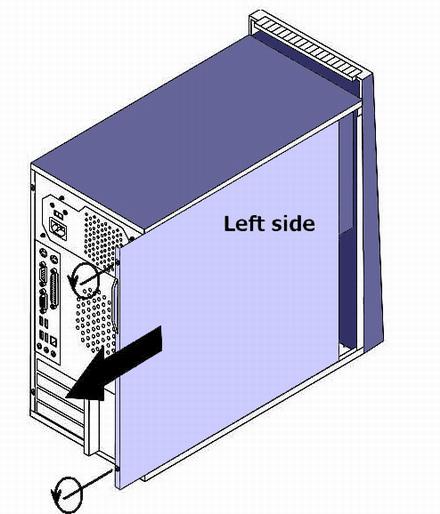
To access the hard drive, you will need to remove just one left side cover of the case. Remove the two screws on the back of the case, slide the cover to the rear, and remove it.
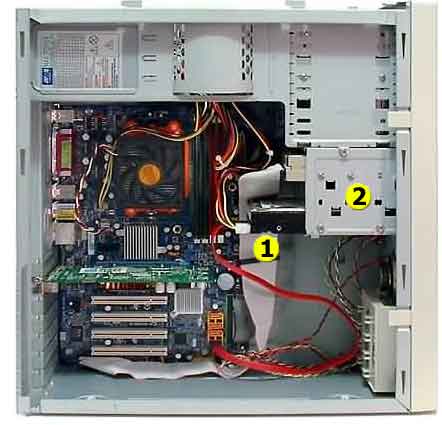
2. Visually locate the hard drive [1] inside the case.
3. Disconnect the power supply and signal cables from the drive.
- Most new hard drives are SATA drives, while older ones are more commonly IDE ATA drives. Refer to the article to identify the type of cables connecting your drive to the power supply and motherboard of your computer.
- If it's hard to remove a hard drive power connector, do not force it hard, instead just wiggle gently as you pull out. Some technicians use the needle-nose pliers to remove it.
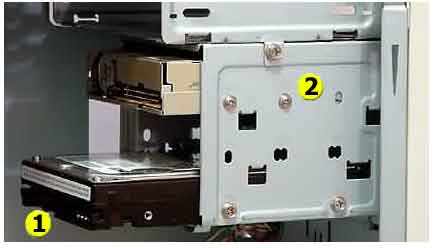
4. Remove the Hard Drive [1] from the bracket [2].
If the drive is attached to the bracket with 4 screws (2 on both sides), you have to remove a right side cover too. Or you may need to remove the whole bracket of the case, and then remove a drive from the bracket.
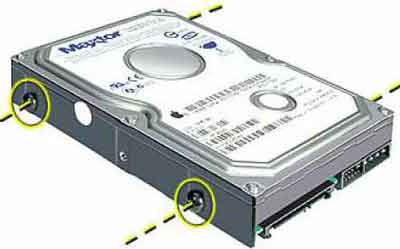
Below is picture of a hard drive with threaded wholes for four screws (to attach to bracket).
There is no problem locating a hard drive inside the normal size desktop system box, as shown above.
There is also a large group of desktop computers with a smaller HDD or SSD (with size factor 2.5 inch for the disks) like HP Mini or Dell OptiPlex Mini/Micro/Ultra models, their design require few more technicalities from a manual to open the case and access the hard drive. In general, removing drive from a slim PC can be a little bit more complicated operation, because it involves finding the way how to access to drive’s rack beneath other components.
